Building instructions
A guide for every piece.
Explore interactive building steps, PDF booklets and CSV parts lists for Lingo Brick designs. Open actual instruction examples before creating.
Limited-time free trial · One free build every day. Choose any one size. Resets at midnight Pacific Time (PT); no rollover.
One design, connected views.
The interactive preview, building steps, PDF booklet and parts list describe the same brick design. Selected sizes have their own results and reading positions. The download package includes the booklet, parts list and layer overview.
What is in each format?
Online steps help you rotate and inspect the design. The PDF presents numbered building instructions. The CSV lists the parts and quantities in that design. The package brings the digital instructions together.
A parts list is not a stock check, shopping quote or promise that every piece is available from a retailer.
| Deliverable | Use it to | Keep in mind |
|---|---|---|
| Interactive steps | Rotate the design and follow each addition. | Use the matching size. |
| PDF booklet | Read numbered instructions on screen or in print. | Page count differs from step count. |
| CSV parts list | Read part descriptions, colors and quantities. | Stock and retailer availability are not checked. |
| Instructions package | Keep the booklet, parts list and layer overview together. | Use the files for the matching model size. |
Choose the view for the task.
Start with the online guide when you need another angle. Use the booklet when you want to read a fixed sequence, and keep the matching parts list beside it. A download becoming ready is different from the file being saved on your device.
| Your task | Open | Check first |
|---|---|---|
| See where the next pieces go | Online building steps | Select the intended size; rotate the preview to inspect placement. |
| Read the sequence away from the viewer | PDF booklet | Match the model and size. PDF pages are not the building-step count. |
| Review the design’s parts and quantities | CSV parts list | Use the list from the same layout; availability is not verified. |
| Keep the related files together | Instructions ZIP | Wait for preparation, then check that your download completed. |
Preview an actual example.
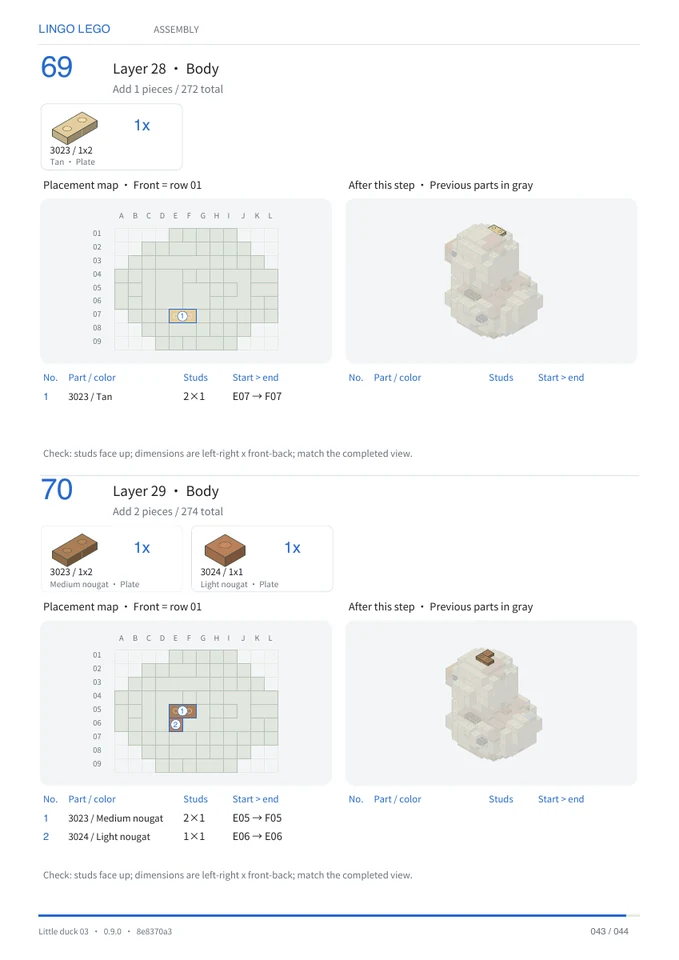
The little duck example contains 274 pieces across 70 building steps, with a 44-page PDF. A step count and a PDF page count are different: a booklet also contains supporting pages and may arrange steps across its pages.
Understand access and checks.
Public models can be previewed without signing in. Full community files require sign-in and the appropriate model rights; some models are showcase only. Buying a community model requires an active Hobby, Creator or Pro subscription, regardless of credit type. Free claims and previously acquired models remain accessible.
Geometry, connectivity, simplified pressure and assembly checks are reported separately. Physical stability is not verified.
Try one free creation.
During the limited-time trial, create one model in any single size free each day. Resets at midnight Pacific Time (PT), with no rollover.
One single-size creation is free each day during the trial. Additional creations use credits; review the quote before submitting. Start with one clear object, inspect the finished design, then open its online building steps and parts list.
PDF and ZIP files are prepared when you request them. Your online guide remains available while those files are being prepared.
Questions before you create.
Are these instructions for a retail building set?
These instructions are for custom digital brick designs created with Lingo Brick. For a retail set, consult its manufacturer’s instructions.
Can I try an instruction sample without buying a model?
The sample PDF, CSV and ZIP linked on this page are publicly available. Community model files have their own access rules and may require sign-in and acquisition.
Does the parts list tell me what I already own?
No. It describes the parts in this design. It does not compare them with your collection or tell you where to buy them.
Do the files guarantee a successful physical build?
No. A consistent digital layout and its instructions do not verify real-world stability, grip or every intermediate construction state. Review the design before using it for a physical build.
Recent published case studies
- Astronaut Rabbit — A text idea with three distinctive details: a rabbit silhouette, a dark visor and a blue backpack.
- Camera Rover — A short text idea separates a gray camera head, a red chassis and black tracks into recognizable shapes and colors.
- Caramel Pudding — A shared reference image becomes a stepped brick silhouette. Compare the yellow body, brown top, red topping and broad base.
Reviewed by the Lingo Brick team · Updated