Text to bricks
Describe a brick model. Get its building steps.
Describe your idea and generate a 3D brick model. Explore the interactive preview, then download PDF building instructions and a parts list. See a real example.
Limited-time free trial · One free build every day. Choose any one size. Resets at midnight Pacific Time (PT); no rollover.
Describe one main object.
Use up to 200 characters. Name the object, its proportions, main colors, pose and the details that matter most. For example: a small yellow duck with a rounded body, orange beak and short wings.
Text and Photo are separate starting points. Choose the one that communicates your idea most clearly.
Choose a few defining details.
Astronaut Rabbit names a recognizable silhouette, a dark visor and a blue backpack. Camera Rover separates a camera head, red chassis and black track shapes. Use these cases to see how a short idea sets priorities, then inspect the result rather than assuming every requested detail survived.
Choose the sizes you want.
Small, Medium and Large are different versions of the same request, not three unrelated creations.
Explore a text-based example.
The little duck is a published text example with 274 pieces and 70 steps. Inspect its actual layout and sample booklet to see what the digital output looks like. The example is not a template used in place of your new description.
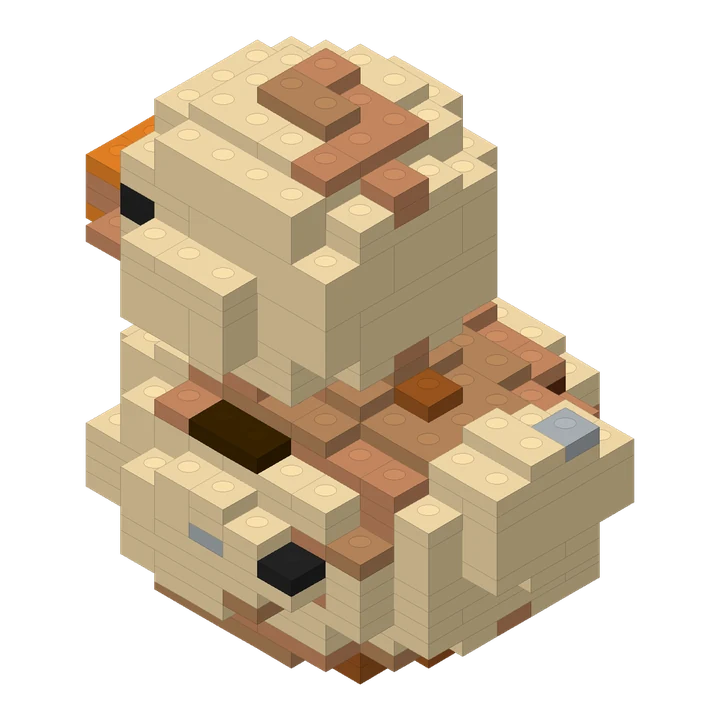
Get a design and its building steps.
Your results include an interactive preview, PDF instructions, CSV parts list and instructions package. Processing continues in the background after your request is saved. Check My projects for progress.
Keep expectations specific.
Results may simplify features or interpret your description differently. A digital model check is not a guarantee of successful physical assembly. Review the preview, steps and separate quality notes.
Try one free creation.
During the limited-time trial, create one model in any single size free each day. Resets at midnight Pacific Time (PT), with no rollover.
One single-size creation is free each day during the trial. Additional creations use credits; review the quote before submitting. Start with one clear object, inspect the finished design, then open its online building steps and parts list.
PDF and ZIP files are prepared when you request them. Your online guide remains available while those files are being prepared.
Questions before you create.
Can an AI brick generator provide instructions instead of only a picture?
Yes. Lingo Brick provides a three-dimensional brick layout, interactive steps, a PDF and a parts list. A brick-style image by itself does not define pieces or a building sequence.
How should I write my description?
Name one main object, then describe its proportions, main colors, pose and defining details in up to 200 characters. Describe the features you want to see rather than asking for an image effect.
Will every result look like the example?
No. Each new description produces its own brick design. Shape, detail, piece count and steps vary with the input and selected size.
Where can I see the creation cost?
Check the current credit quote in the creation screen before submitting. Selected sizes affect the quote; this guide does not replace the current product pricing.
Recent published case studies
- Astronaut Rabbit — A text idea with three distinctive details: a rabbit silhouette, a dark visor and a blue backpack.
- Camera Rover — A short text idea separates a gray camera head, a red chassis and black tracks into recognizable shapes and colors.
- Caramel Pudding — A shared reference image becomes a stepped brick silhouette. Compare the yellow body, brown top, red topping and broad base.
Reviewed by the Lingo Brick team · Updated